 Castellan




On an NPU, graphics card or processor
Finally, AI staff that work on your own PC.
Ready-made staff for your Windows PC, each with one chore: your screenshots found by the words in them, your documents and mail searched and answered from, your voice chats captioned. Their AI runs on the PC itself, so your files never leave it: coolest on an NPU, fine on a graphics card or processor.
Then from $3 a month for up to 3 PCs, and stop paying and they keep working. Needs Windows 11 (24H2 or later) and 16 GB of memory: what your PC needs.
On an NPU, graphics card or processor
Search your screenshots by the words in them. Ask your documents and mail.
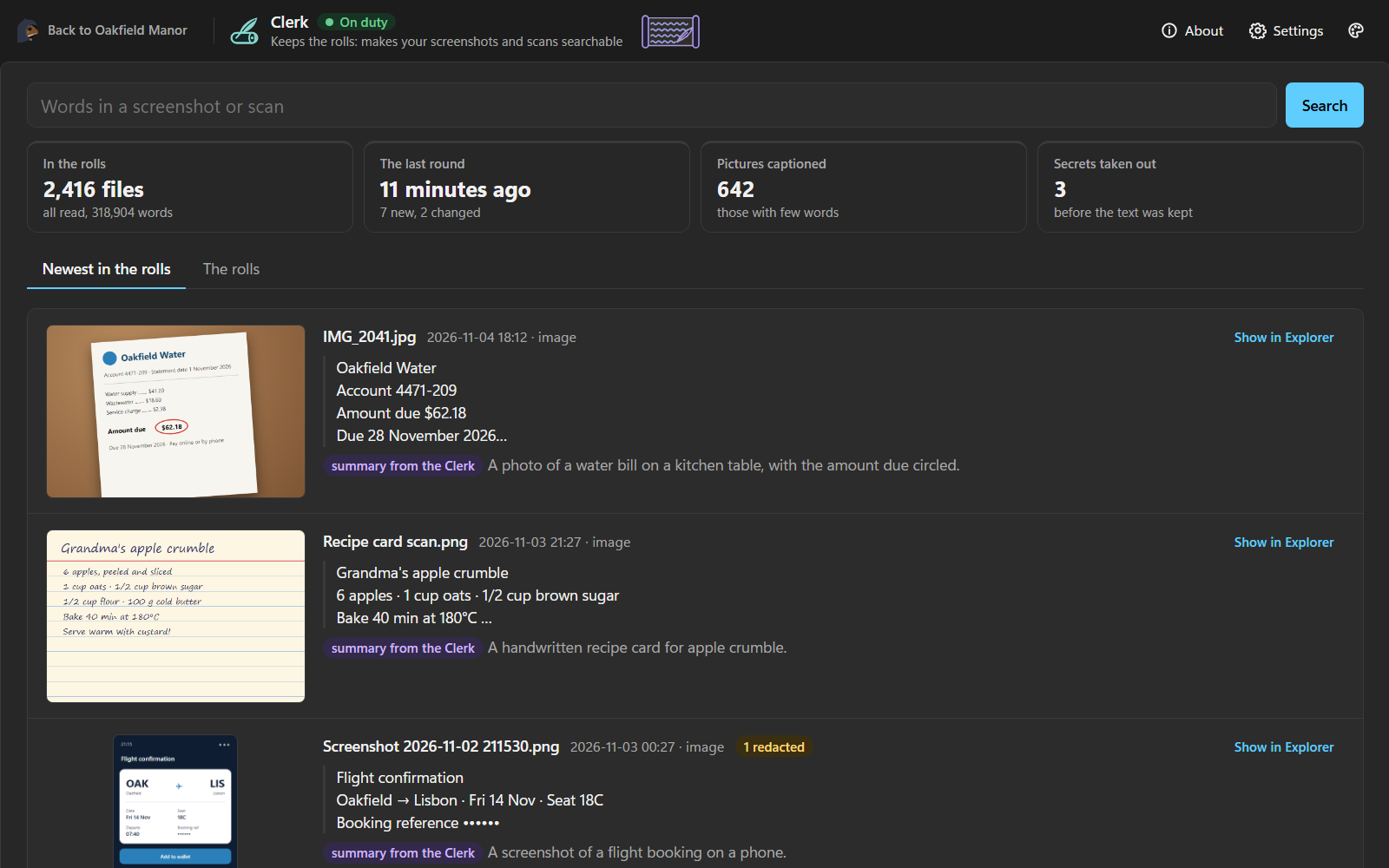
Ready-made staff for your Windows PC: the Clerk reads your screenshots, scans and photos, so a search for “water bill” finds the photo of it, and the Chamberlain answers from your files and email. Their AI runs on the PC itself, so your files never leave it: fastest on an NPU, fine on a graphics card or processor.
Then from $3 a month for up to 3 PCs, and stop paying and they keep working. Needs Windows 11 (24H2 or later) and 16 GB of memory: what your PC needs.
On an NPU, graphics card or processor
Search your screenshots by the words in them.
The Clerk reads your screenshots, scans and photos on your own Windows PC, so a search for “water bill” finds the photo of it. Its AI runs on the PC itself, so your files never leave it: fastest on an NPU, fine on a graphics card or processor.
Then from $3 a month for up to 3 PCs, and stop paying and they keep working. Needs Windows 11 (24H2 or later) and 16 GB of memory: what your PC needs.
On an NPU, graphics card or processor
Ask your documents and your mail.
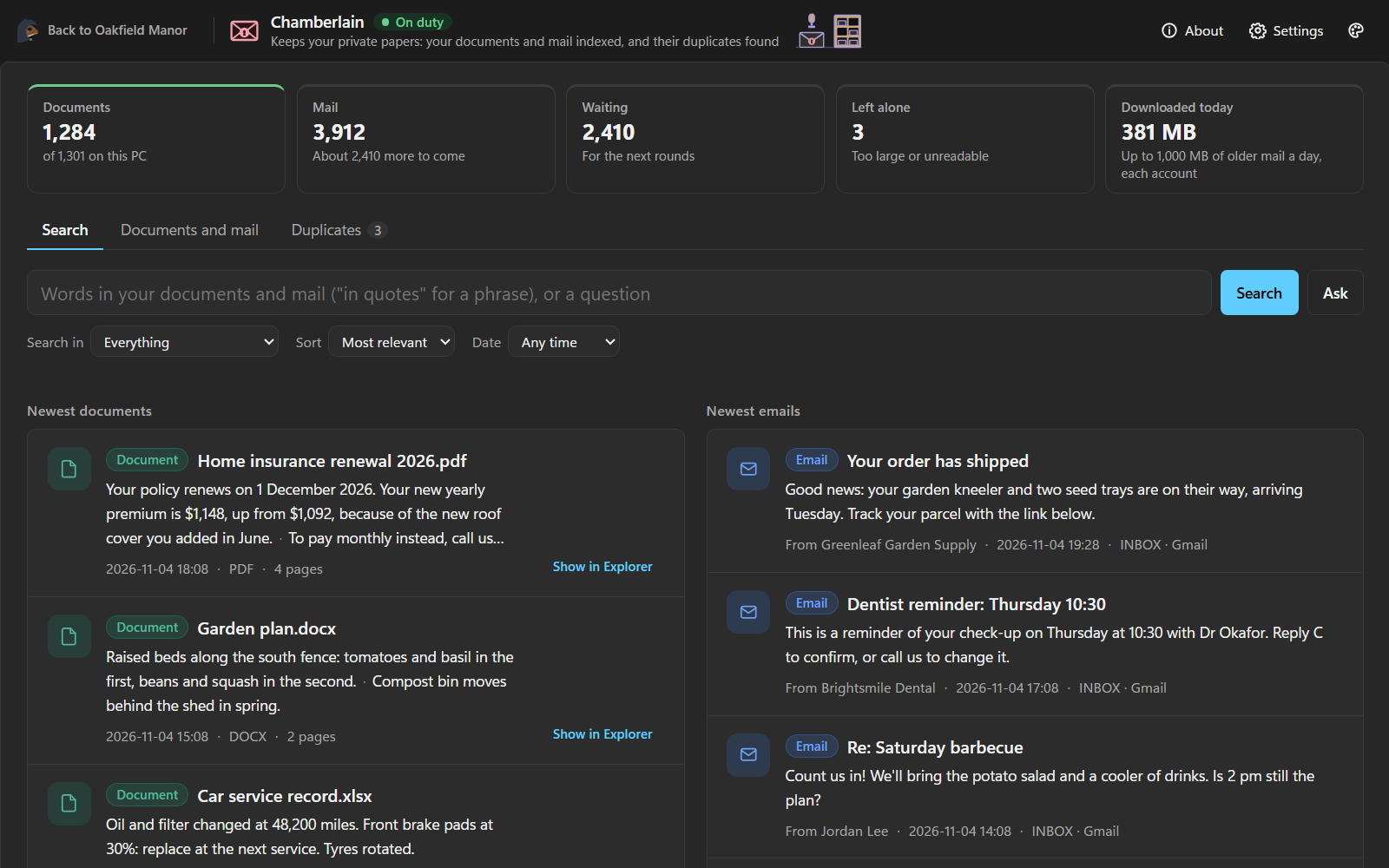
Ask in your own words: the Chamberlain searches your files and email together on your own Windows PC, and answers from them. Its AI runs on the PC itself, so your files never leave it: fastest on an NPU, fine on a graphics card or processor.
Then from $3 a month for up to 3 PCs, and stop paying and they keep working. Needs Windows 11 (24H2 or later) and 16 GB of memory: what your PC needs.
- Which AI models?
- Small, open ones that run on your PC: Qwen3-VL-2B for chat and pictures on most PCs, and smaller ones for search, captions and reading text. Each one, by PC
- How big a download?
- The local AI is 2.5 to 14 GB, once, depending on your NPU and graphics card. 20 GB free covers it all. What your PC needs
- What goes online?
- Never your files, or anything the AI reads: no cloud AI, no analytics. It checks your license and fetches updates, and works offline once it's set up. Everything it sends
- Is the setup signed?
- Yes, code-signed, and it checks every file it downloads against a list we sign. Right after a release, Windows may still ask before it runs it. What the setup does
- And to uninstall?
- Windows' Settings > Apps > Castellan > Uninstall. You choose whether its settings and data go too. Uninstalling
Step 1
Download the setup
For your PC's processor, straight from this page: no account first.
Step 2
Run it on your Windows PC
Your email and a six-digit code start the 7 days: no card and no password. Then it asks what you use the PC for.
Step 3
Pick your first staff
The ones that suit your use come checked. The local AI sets itself up for your NPU, graphics card or processor while they install.
See it at work
What the staff do on your PC.
Find a picture by the words in it
The Clerk reads your screenshots, scans and photos, so a search for “water bill” finds the photo of it.
Ask your documents and mail
The Chamberlain searches your files and email together, and answers from them.
Voice chats captioned as people speak
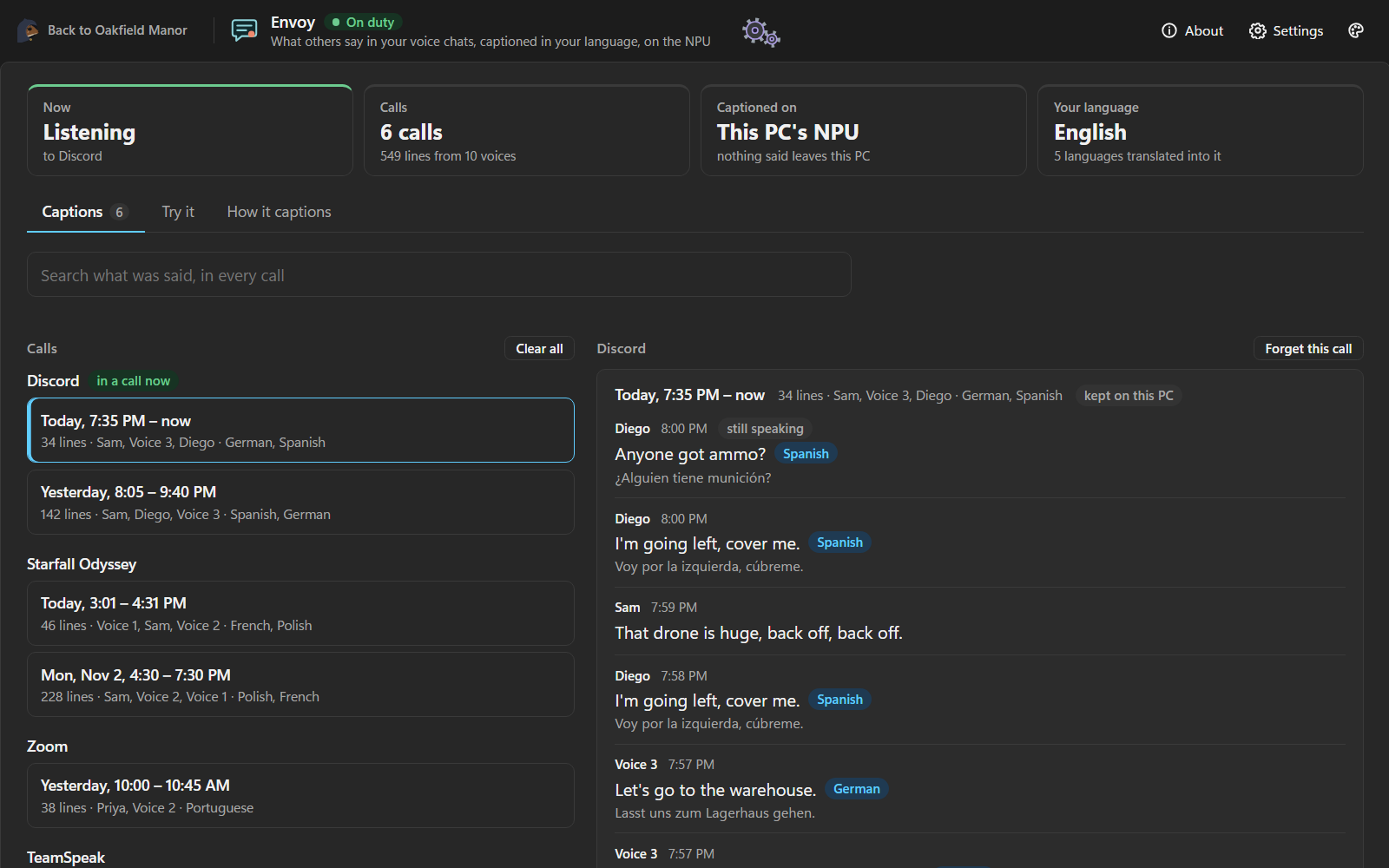
The Envoy captions a Discord call, and shows what's said in Spanish, German and other languages in English.
Made for AI
An NPU runs AI on very little power, so your processor and graphics card stay free for you.
Private by design
Your files stay on your PC, and once it's set up it works offline.
Gentle in the background
The staff work a little at a time, so your own work comes first.
What the local AI does
The jobs it gets
Anything that changes your files or your PC waits for your yes.


For everyday PCs
Your PC, on household duty.

Clerk
Makes screenshots and scans searchable, and captions pictures

Porter
Says in a line what each new program on your PC is
Also on staff, without the AI: the Cellarer, the Watchman and the Constable.
For gamers
You play. Castellan minds the PC.
Most gaming PCs have no NPU, so the staff's AI runs on your graphics card. Its models are sized for an NPU, a far smaller chip, so a modern graphics card runs them with ease.

Herald
Sums up your games' patch notes and graphics driver news

Miller
Picks out the highlights of your long game recordings

Surveyor
Checks your PC is working, and says what to mend
Also on staff, without the AI: the Watchman, the Farrier, the Marshal, the Bridgeward and the Constable.
For developers
Your PC reads the logs for you.
Reeve and the Assayer are MCP servers, so they work with the popular AI coding assistants. They hand your assistant a few lines instead of whole logs and test runs: fewer tokens, and usage limits that last longer.

Reeve
An MCP server: digests build logs and searches your code, so your assistant spends fewer tokens

Developer Herald
Sums up new releases of the projects your code depends on

Pinder
Finds stray processes and the ports they hold, with a note on each

Smith
Runs the local AI's model servers, and stops the idle ones
Also on staff, without the AI: the Assayer, the Toller and the Steward.
Measured in our own laptops
What it does on an NPU
Our own model reads 97% of the lines right. Windows' own reads 59%.
The Clerk and the Warrener find your screenshots, scans and PDFs by the words in them.
How we measured itQuick on the NPU, and light on power.
On an Intel Core Ultra, our own build of the AI does three everyday jobs on 81 J: about half the graphics' energy, and under a third of the processor's. The graphics finish first.
How we measured itVoice chat captioned with fewer than 1 word in 10 wrong.
In our test on a Snapdragon X2 Elite Extreme's NPU, Envoy got that in Spanish, French, Dutch and Polish, read aloud: French, Dutch and Polish once a first call in one has fetched a model that hears them better. The local AI translates what it hears, on your PC.
How we measured itHow fast it runs
Every NPU we've tested, timed in our own laptops, and which part does each job.
How we measured itWhat runs on the NPU, and what doesn't
Finally, a good use for your computer's NPU.
Where your PC has an NPU, it does most of the staff's AI work, quietly and on very little power. Not all of it: each maker's NPU is better at some jobs than others, so the setup sends each job where it runs best, and the rest to the graphics card or the processor.
| The job | Snapdragon X | Intel Core Ultra | AMD Ryzen AI |
|---|---|---|---|
| Reading and writing | NPU | NPU | NPU |
| Pictures | NPU | Processor→NPU | Graphics→NPU |
| Search | NPU | NPU | Graphics |
| Sorting search results | NPU | GraphicsorProcessor | GraphicsorProcessor |
| Speech to text | NPU | NPU→Processor | NPU→Processor |
| Text in pictures and scans | NPUorProcessor | NPUorProcessor | NPUorProcessor |
| Matching photos and videos | NPUOn every NPU PC | ||
| Anything the NPU can't do, or fails at | GraphicsorProcessorOn every NPU PC | ||
Which chips each line holds for
Snapdragon X
- Pictures. On a Snapdragon X2 the NPU looks at the picture and answers about it. On the first Snapdragon X, the graphics look at the picture and the NPU answers about it.
- Sorting search results. On a Snapdragon X2. The first Snapdragon X leaves it to the graphics or the processor.
- Speech to text. The NPU takes in the sound and writes out the words, with a bigger speech model for clearer captions. While another program keeps it busy, the processor writes them.
- Text in pictures and scans. Our own text-reading model, on the processor if the NPU fails the reader's own test.
Intel Core Ultra
- Reading and writing. The first start prepares the model for your NPU: half a minute to just over a minute, once for each PC and driver.
- Pictures. The processor looks at the picture, and the NPU answers about it.
- Search. On Core Ultra Series 1, 200U and 200H, the graphics beside the NPU: much quicker there. On a 16 GB PC with one of Intel's newer NPUs, the graphics too, to leave the NPU room to chat.
- Sorting search results. Intel's NPU doesn't do it. The graphics start when it's needed and stop once it isn't.
- Speech to text. On Core Ultra Series 1, 200U, 200H, 200S and 200HX, the NPU takes in the sound and writes out the words, and Envoy offers a bigger speech model for clearer captions. On Intel's newer NPUs it writes them too once a short check on your PC passes, and Envoy offers the bigger model where it keeps up; until then the processor writes them.
- Text in pictures and scans. Our own text-reading model: on the NPU in Core Ultra Series 1, 200U and 200H, and on the processor on Intel's other NPUs until we've measured them.
AMD Ryzen AI
- Pictures. The graphics read pictures more reliably than AMD's NPU, so they take them: they start when a picture comes and stop once they're done. Chat stays on the NPU.
- Search. Not on AMD's NPU: the graphics do it, or the processor on a PC without them.
- Sorting search results. AMD's NPU doesn't do it. The graphics start when it's needed and stop once it isn't.
- Speech to text. On Ryzen AI 300 and later, the NPU takes in the sound and writes out the words, and Envoy offers a bigger speech model for clearer captions. On older Ryzen AI chips, the processor writes them.
- Text in pictures and scans. Our own text-reading model, in a copy made for AMD's NPU: on Ryzen AI 300 and later. On older Ryzen AI chips, or if the NPU fails the reader's own test, the processor reads.
Matching photos and videos. Heiward's, to find duplicates. The videos' frames are decoded by the graphics, or the processor.
In the docs: How the staff take turns on the NPU, the graphics card and the processor
In Task Manager
Why the NPU isn't always busy, and the processor is
That's normal: the NPU only does the AI part, and most of the staff's work is ordinary work.
Most of the work isn't AI
Copying backups, shrinking videos, scanning folders, keeping code up to date: that's ordinary work for the processor (and the graphics card, for videos). The NPU is used only for the thinking.
The staff themselves run on the processor
Each employee is a program running on your processor. It gets each question ready for the NPU and handles each answer, so the processor works a little while the NPU thinks.
One job at a time
The NPU answers one request at a time, and the staff take turns, a long job in short turns so nobody waits long. Between turns, and while an employee gets its next question ready, the NPU has nothing to do.
It rests when there's nothing to do
After 10 minutes with nothing to do (sooner on a PC with less memory), the AI is stopped to give its memory back. The next job wakes it in a few seconds.
Some AI work goes elsewhere
Depending on who made your NPU, pictures, search or speech may run on the graphics or the processor, where they work better today. The table above says which.
Calls come first
While Envoy captions a call on the NPU, the staff's background AI work waits until the call ends, so the captions keep up. A question you're waiting on still gets its turn. When the call isn't translated, the NPU's chat model is put away after two minutes unused, and its memory goes to the call.
Gentle by design, quick when there's room
Your apps come first: the staff work a couple at a time, at a lower priority. When the PC is plugged in, cool and not busy, they finish their waiting AI work in one go; otherwise they do a little at a time. You can change this under NPU work in Castellan's Settings.
In the docs: Background work and NPU work in Castellan's Settings
Supported NPUs
The NPUs it runs on
Tested means we ran Castellan on that chip, in a real laptop.
Snapdragon X
Hexagon NPU, Snapdragon X2 (Hexagon v81) · 80 TOPS · since 2026
- Snapdragon X2 Elite Extreme (X2E94100)Tested on 10/07/2026
- Snapdragon X2 Elite and X2 Plus, the other models
Hexagon NPU, Snapdragon X (Hexagon v73) · 45 TOPS · since 2024
- Snapdragon X, X Plus and X Elite (the first generation)
Not supported: Snapdragon 8cx, 8c, 7c, SQ1–SQ3, 850 or 835 (Hexagon v68 or older). There, the graphics card or processor does the work.
Intel Core Ultra
Intel NPU 5 · up to 50 TOPS · since 2026
- Intel Core Ultra Series 3
- Intel Core Series 3 · up to 17 TOPS
Intel NPU 4 · up to 48 TOPS · since 2024
- Intel Core Ultra 7 256VTested on 10/12/2026
- Intel Core Ultra 200V, the other models
Intel NPU 3720 · about 11 to 13 TOPS · since 2023
- Intel Core Ultra 5 225UTested on 10/14/2026
- Intel Core Ultra 200U and 200H, the other models
- Intel Core Ultra Series 1
- Intel Core Ultra 200S (desktop) and 200HX
AMD Ryzen AI
AMD XDNA 2 · 50 to 60 TOPS · since 2024
- AMD Ryzen AI 7 350 · 50 TOPSTested on 10/15/2026
- AMD Ryzen AI 300, Ryzen AI Max and Ryzen AI 400, the other models
Not supported: Ryzen 7040/8040, Phoenix and Hawk Point (XDNA). There, the graphics card or processor does the work.
A newer NPU not listed here gets a careful try, and is used only if it works. What your PC needs
Prices
From $3 a month. Keep what you paid for.
Try everything free for 7 days, no card needed. Heiward, who finds duplicate photos and videos, is free for good.